
Every minute, billions of people perform visual searches online — yet most of them still rely on outdated habits like typing vague keywords and scrolling endlessly through irrelevant results. The truth is, modern image search techniques have evolved far beyond simple keyword matching, but most users have not kept pace with the technology.

If you have ever wondered how a journalist verifies a viral photo within seconds, how a shopper finds the exact dress they spotted on Instagram, or how investigators trace stolen artwork across continents, the answer lies in mastering the right image search techniques. This guide walks you through every method that matters in 2026 — from classic keyword queries to AI-powered multimodal search — so you can find, verify, and analyze any visual with confidence.
What Is Image Search and Why It Matters
Image search is the process of locating visual content using one or more inputs: a text query, an uploaded image, a URL, or even a combination of all three. While the concept sounds simple, the technology behind it has transformed dramatically over the past decade.
Today’s systems do not merely match pixels. They interpret context, identify objects, recognize faces, detect edits, and compare visual fingerprints across billions of indexed images. For e-commerce teams, that means higher conversions. For newsrooms, it means catching misinformation before it spreads. For everyday users, it means finding the answer to “what is this thing?” in seconds.
Industries that depend most heavily on visual search today include:
- E-commerce — product discovery and “shop the look” experiences
- Journalism — verifying authenticity of viral images
- Marketing — monitoring brand assets across the web
- Law enforcement — facial recognition and stolen-property tracking
- Education and research — identifying specimens, artifacts, and archival photos
How Image Search Actually Works
Before diving into specific techniques, it helps to understand what happens after you hit “search.”
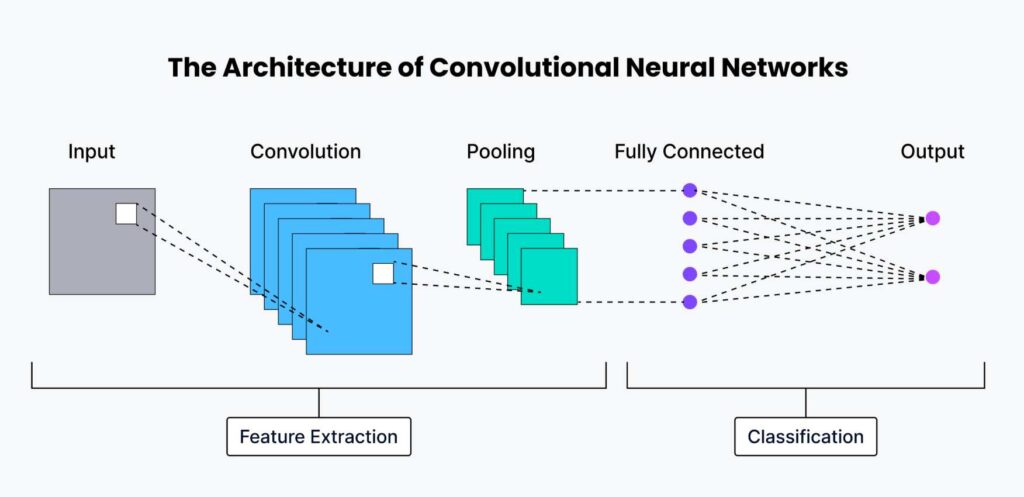
Show Image Suggested image: A flowchart showing the journey from uploaded image → feature extraction → neural network → vector embedding → matched results. Alt text: “How modern image search algorithms work”
Feature Extraction with Computer Vision
When you submit an image, the system breaks it down into measurable features — edges, corners, textures, color distribution, and key points. Classic algorithms like SIFT and SURF pioneered this approach, identifying unique points that remain stable even when an image is rotated, resized, or partially obscured.
Deep Learning and Neural Networks
Modern platforms rely on convolutional neural networks (CNNs) trained on hundreds of millions of labeled images. These models do something earlier algorithms could not: they understand what an image is, not just what it looks like. A CNN can tell the difference between a German Shepherd and a wolf, or between a Renaissance painting and a modern reproduction.
Vector Embeddings and Similarity Matching
Every indexed image is converted into a long string of numbers called an embedding — essentially a mathematical fingerprint. When you search, your query image is converted into its own embedding and compared against the database using distance measures like cosine similarity. Images with the closest fingerprints rise to the top of your results.
This is why a search for a red leather sneaker can surface visually similar shoes from dozens of brands you have never heard of — the system matches shapes, materials, and silhouettes, not just product names.
The 10 Most Effective Image Search Techniques
There is no single “best” way to search for an image. The right technique depends on what you are trying to accomplish. Below are the ten approaches that consistently deliver the strongest results.
1. Keyword-Based Image Search
The oldest and still most common method. You type a description into Google Images, Bing, or any visual search engine, and the system returns images whose metadata, alt text, captions, or surrounding content match your query.
When to use it: Finding stock visuals, blog illustrations, or general reference photos.
Pro tip: Skip generic words like “car” and use specific phrases like “matte black 2024 sedan side profile.” Long-tail descriptions match how images are actually labeled on the web.
2. Reverse Image Search
Instead of describing the image you want, you provide the image itself — either uploaded from your device or pasted as a URL. The system then finds where else that image appears online, including edited or resized versions.
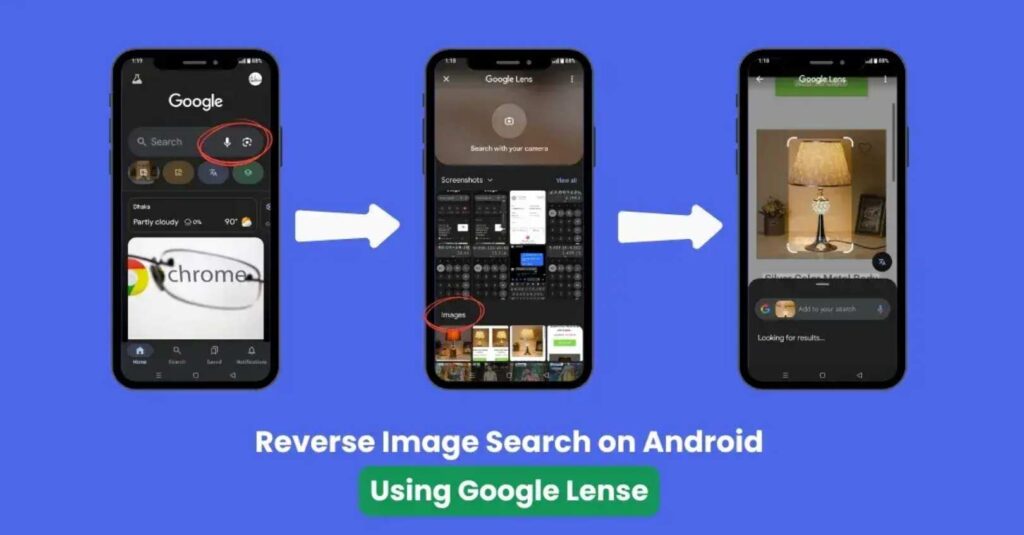
Show Image Suggested image: Screenshot or illustration of someone uploading an image to Google Lens or TinEye and seeing matching results. Alt text: “Reverse image search example using Google Lens”
When to use it: Verifying the original source of a photo, checking whether your own images have been stolen, or identifying an object you cannot name.
A journalist receiving an emotional viral image can use reverse search to discover it was actually captured five years earlier in a completely different country — a quick check that prevents a misinformation cascade.
3. Visual Similarity Search
This technique answers the question “show me images that look like this,” rather than “find this exact image.” The algorithm focuses on composition, color palette, mood, and overall style.
When to use it: Interior designers gathering inspiration, fashion shoppers hunting for similar outfits, or content creators looking for visuals in a consistent aesthetic.
4. Color-Based Image Search
Some platforms allow you to filter or search using a dominant color or hex code. Pinterest and Adobe Stock are especially strong at this.
When to use it: Building a brand mood board, finding images that match a specific palette, or curating content for a campaign with strict color guidelines.
5. Facial Recognition Search
Specialized engines like PimEyes and Yandex use facial geometry — distance between eyes, jawline curvature, ear shape — to find other photos of the same person across the web.
When to use it: Verifying identities in journalism, running privacy audits on your own online presence, or supporting missing-person investigations. Because the privacy implications are serious, always confirm you have a lawful and ethical reason before running these searches.
6. Object Recognition Search
Tools like Google Lens identify discrete objects inside a photo — a houseplant, a wristwatch, a landmark — and let you act on each one independently.
When to use it: Shopping in the real world (point your phone at a chair to find similar ones online), identifying plant or animal species while hiking, or translating signs while traveling.
7. Pattern and Texture Search
A more specialized technique that focuses on repeating designs — paisley, herringbone, brick patterns, microscopic textures.
When to use it: Textile designers sourcing fabric, architects researching surface treatments, or materials scientists looking for visual references.
8. Metadata-Based Search
Every digital image carries hidden EXIF data: when it was taken, where, on what device, and sometimes with what camera settings. Some platforms let you search this metadata directly.
When to use it: Forensic investigations, photo archive management, or verifying when and where a photo was actually captured.
9. Context-Based Search
Rather than analyzing the image in isolation, this technique factors in the surrounding webpage content. The same photo of a laptop returns one set of results when it lives on a tech blog and a different set when it lives on a retail product page.
When to use it: Researching how a particular visual is being framed across the internet, or competitive intelligence on how rivals position their imagery.
10. Hybrid (Multimodal) Image Search
The newest and most powerful approach combines text, image, and sometimes voice into a single query. You upload a photo of a jacket and add the text “in olive green under one hundred dollars.”
When to use it: Precision shopping, fine-grained research, and any task where neither text nor image alone fully captures what you want.
Best Image Search Tools in 2026
Choosing the right tool can dramatically change your results. Each platform has a distinct database, recognition model, and area of strength.
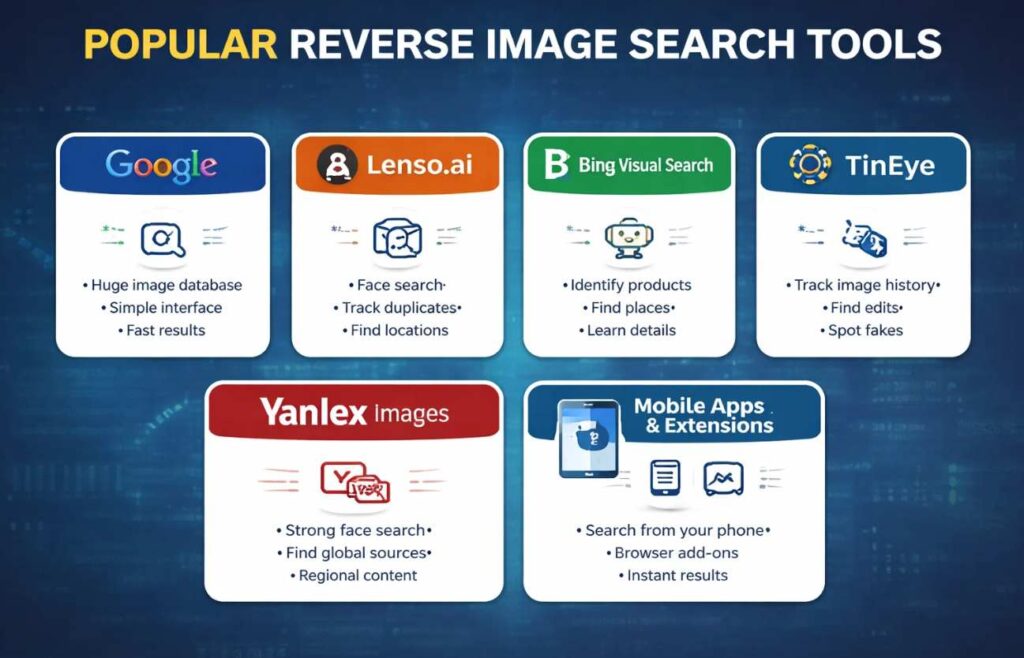
Show Image Suggested image: A collage of logos — Google Lens, TinEye, Yandex, Bing, Pinterest, Shutterstock. Alt text: “Best image search tools in 2026”
| Tool | Best For | Standout Strength |
|---|---|---|
| Google Images & Lens | General use, mobile real-time search | Largest index, deepest integrations |
| TinEye | Exact-match reverse search | Detects edits and crops reliably |
| Yandex Images | Faces and lesser-indexed regions | Often surfaces results Google misses |
| Bing Visual Search | Object detection in scenes | Strong shopping integrations |
| Pinterest Lens | Aesthetic and lifestyle inspiration | Visual similarity at scale |
| PimEyes | Facial recognition audits | Useful for personal privacy checks |
| Shutterstock & Adobe Stock | Licensed, copyright-safe visuals | Eliminates legal risk |
For serious work, no single tool is enough. Cross-checking the same image across two or three platforms is the fastest way to catch what any one of them might have missed.
Best Practices for Sharper Image Search Results
Even the best tools fail when used carelessly. A few habits separate effective searchers from frustrated ones.
Start with the highest-quality source image you have. Blurry crops and low-resolution screenshots strip away the features algorithms depend on. Whenever possible, use the original file rather than a downloaded thumbnail.
Combine techniques rather than relying on one. Verify a suspicious image with reverse search, then check its context across the web, then run a metadata inspection if it still feels off.
Use filters aggressively. Most users never touch the filter panel, but options for size, color, freshness, and usage rights dramatically narrow the noise.
Check usage rights every time. If you intend to publish or republish an image, “available on Google” does not mean “free to use.” Licensed libraries and Creative Commons filters keep you on safe legal ground.
Test more than one platform. Yandex and Google index different parts of the web. TinEye sees crops that visual similarity engines ignore. Diversification protects you from blind spots.
Common Mistakes That Sabotage Image Searches
A handful of avoidable errors quietly ruin most search sessions:
- Uploading heavily compressed screenshots instead of original files
- Trusting the first result without cross-checking
- Searching with overly broad terms like “shoes” or “house”
- Ignoring the date filter when researching breaking news
- Forgetting that watermarks, cropping, and recolors confuse some engines
Slowing down for thirty seconds to refine the query saves hours of follow-up work.
Practical Applications Across Industries
Image search is no longer a niche tool. It now sits at the center of operations in many fields.

Show Image Suggested image: A four-quadrant visual showing e-commerce, journalism, security, and design use cases. Alt text: “Practical applications of image search techniques”
In e-commerce, customers who use visual search on product pages convert at meaningfully higher rates than those who only browse text categories — some brands report conversion lifts of 30 percent or more after adding “search by photo” to their apps. In journalism and fact-checking, reverse image search is the first line of defense against fabricated viral content. In law enforcement, facial and object recognition help locate missing persons and recover stolen property. In education and research, students use image search to identify specimens, artifacts, and historical photographs. In marketing, brands monitor where their visuals appear online to protect trademarks and measure organic reach.
Each of these use cases relies on a different combination of the techniques outlined earlier — which is exactly why understanding the full toolkit matters.
The Future of Image Search Techniques
Three shifts are reshaping what comes next.
Multimodal AI will continue to blur the line between text, image, and voice. Already, models can answer questions about a photo in natural language. Soon, the search box itself will disappear into ambient assistants that understand visual context without prompting.
Augmented reality will turn every smartphone camera into a live search interface. Point your phone at a restaurant and see reviews. Point it at a plant and see care instructions. Point it at a product and see prices across the web.
On-device processing will let powerful visual search run locally rather than in the cloud, improving both privacy and speed. The combination of edge AI and stronger neural networks means image search will feel less like a separate task and more like a sixth sense you carry with you.
Conclusion
Image search has quietly become one of the most useful skills of the modern internet. Knowing when to type a keyword, when to upload a photo, when to chase a color, and when to combine all three is what separates a frustrating five-minute scroll from a thirty-second answer.
The techniques in this guide are not theoretical. Pick the one that fits your most pressing problem — verifying a photo, shopping for a product, protecting your brand — and try it today on a real task. The difference in results is usually obvious within the first attempt.
The visual web is only growing. Mastering image search techniques is no longer optional for anyone who works with information, products, or media. The good news is that the tools have never been more accessible, and the methods above will continue to compound in value as AI keeps improving them.
Frequently Asked Questions (FAQs)
What are image search techniques?
Image search techniques are the various methods used to locate visual content online — including keyword search, reverse image search, visual similarity search, color-based search, facial recognition, object recognition, and hybrid multimodal search. Each technique suits different use cases, from product discovery to journalistic verification.
How is reverse image search different from a normal image search?
A normal image search starts with text and returns matching images. Reverse image search starts with an image and returns where else that image (or edited versions of it) appears online. It is the standard tool for verifying authenticity and tracing original sources.
Which image search technique is best for online shopping?
A combination of object recognition and visual similarity search delivers the strongest results. Tools like Google Lens, Pinterest Lens, and Bing Visual Search let shoppers upload a photo and instantly find matching or similar products across major retailers.
Can I verify whether a viral photo is real?
Yes. Upload the image to Google Images, TinEye, and Yandex Images. If the photo appears in older articles, in different contexts, or with visible edits, you have strong evidence it is being recycled or manipulated.
Are there free image search tools?
Many of the best tools are free for individual use, including Google Images, Google Lens, TinEye (with daily limits), Bing Visual Search, Yandex Images, and Pinterest Lens. Premium libraries like Shutterstock and Adobe Stock are paid but ensure copyright safety.
How does AI improve image search results?
AI-powered models, especially convolutional neural networks, allow search engines to understand what is inside an image — objects, faces, scenes, even emotions — rather than relying only on filenames or surrounding text. This is what makes today’s image search techniques far more accurate than they were even five years ago.